Who it's foragency and independent recruiters
“What did he say his number was?”
Your client calls on Thursday and asks, and all you have from Monday is "145?" in a margin. Once the candidate has said yes, Recordist records the call on your own machine, with nothing joining it, and writes up what they want and when they can start. The record stays with you, so later you can search a word such as "notice" and hear the sentence it was said in, while the audio is kept.
The browser demo is the real app with made-up meetings. Nothing is recorded.
Summary
- Role they want: Head of finance at a SaaS company that is scaling, ideally Series B or Series C.
- Pay they are looking for: 145,000 base, with a bonus on top.
- Notice period: Eight weeks, and his employer is strict about it.
- Earliest start: The second week of January.
- Location and working pattern: Hybrid, two days in the Chicago office at most.
- Other interviews: A second round with a fintech next Tuesday, the only other interview.
- Why they would move: His team has been folded into the parent company, so he would not be running anything of his own.
Action items
- Send the job spec · You, tomorrow Time in call 17:53
- Speak to the client about the bonus · You, Thursday Time in call 17:53
- Send the updated CV · Nathan, today Time in call 18:06
Open questions
- Is there a bonus scheme for this role?
The follow-up
Written with the notes, for you to read and send.
The draft is written from what was said on the call, and it is yours to read, change and send from your own mail. Recordist sends nothing. The follow-up comes with Pro, and every new install includes 7 days of Pro, with no card.
On the Fast built-in model, no email is filled in for you. You tick the lines you want, and the draft is made from exactly those.
Follow-up draftPro
Hi Nathan, You are looking for head of finance at a SaaS company that is scaling, at 145,000 base with a bonus on top. Your notice period is eight weeks, so the earliest you could start is the second week of January. Next steps: - I'll send you the job spec by tomorrow. - I'll speak to the client about the bonus by Thursday. - You'll send me your updated CV tonight. Thanks,
Example, written by hand from the same staged call.
The template
Ask Recordist for notes in this shape.
- In Recordist, open Settings, then Templates, and press New template.
- Copy the three fields across, over the words already there. Leave summary and action items ticked, and tick questions and followup email as well.
- Press Save. To use it on every call, choose it under Settings, AI notes, Default template. For a call you have already recorded, choose it above the notes and press Regenerate.
Your own templates are on every plan, and the words are yours to change. How templates and the check against the transcript work.
Name
Candidate call
Short description
What the candidate wants and when they can start.
Instructions for the model
Write the notes a recruiter keeps after a call with a candidate. Write the summary as a list with exactly these labels, one short bullet each, and leave out a label nobody talked about:

- Role they want:
- Pay they are looking for:
- Notice period:
- Earliest start:
- Location and working pattern:
- Other interviews:
- Why they would move:

Write figures and dates exactly as the candidate said them. In the notes and the email, never write what the candidate earns now, even if they said it, and leave out anything said about age, family, health, religion or nationality. Do not rate, rank or recommend anyone.
01
Recordist runs on Macs with Apple silicon and macOS 14.6 or later, on 64-bit Windows 10 or 11, and on x86_64 Linux, all free from the download page.
02
There is no account, and we never receive your audio. The Privacy Ledger in the app lists the network requests it makes, apart from a few kinds listed in Help, none of which carries meeting content.
03
Nothing joins the call and nothing tells the other person, so you ask out loud and click Record after a yes. The free consent script tool gives you the words for where you both are.
04
Recording, transcription, search and export are free. AI notes are unlimited during your 7 days of Pro and then 3 a month. Pro removes that limit and adds Prep Briefs before you meet someone again. Its price is on the pricing page, and if you subscribe at the launch price, it stays the same for as long as you stay subscribed.
-
Does a bot turn up in my candidate call?
No. Recordist listens on your own machine, to your microphone and the sound of the call, so nothing appears in the participant list and the candidate sees the same call they would see without it. It works the same whoever set up the call and whichever platform they chose.
-
How do I ask a candidate if I can record?
Recordist doesn't tell the other person that it is recording, and it can't ask them. You ask out loud, and click Record after a yes. One way to say it: "Before we start, would you mind if I record this so I can listen instead of typing? The recording stays with me, and it's completely fine to say no."
If they say no, click Not this one and take notes the way you normally do. Some places require everyone on the call to agree, and the free consent script tool gives you the words and the rule for where you and the candidate are.
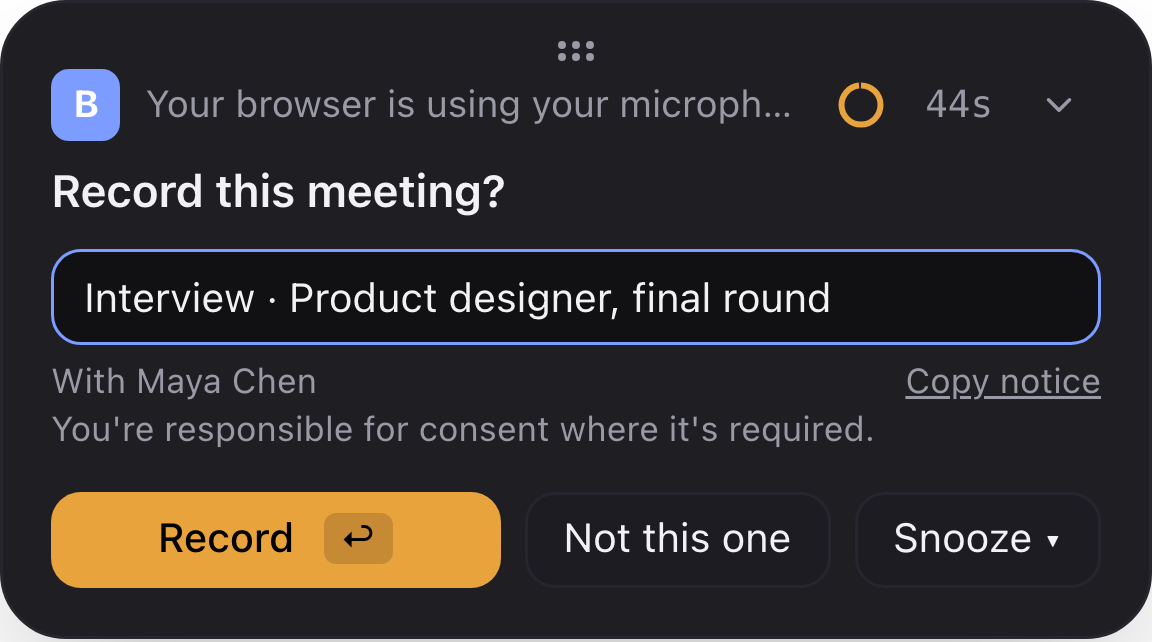
The card that appears when a call starts. Nothing is recorded until you click Record, unless you have put that app on the automatic-recording list in Settings. -
What about phone screens?
A screen you take on your mobile never plays through your machine, so there is nothing for Recordist to record. If you take the same screen on your machine, on a video call or a calling app, it is recorded like any other call, after a yes.
-
Who said they could start in January?
Type a word such as "notice" or "January", and Recordist lists every meeting where it was said, with the sentence and the time. Click a result to open the meeting at that line, then click the time to hear it while the audio is kept. The search index stays on your own machine and works offline.
-
Why does the template leave out what they earn now?
Some places bar employers, and the recruiters working for them, from asking what someone earns today. So the template asks for what the candidate is looking for, and tells the notes to leave out what they earn now, even when they volunteer it, along with anything said about age, family, health, religion or nationality.
Notes can miss an instruction like this, so read them before they go to a client. The transcript, and the audio while it is kept, still hold every word. Once it is pasted the template is yours, and you can change it to fit the rules where you work.
-
Will it rate or recommend a candidate?
No. The template says "do not rate, rank or recommend anyone", as the Interview template built into Recordist does, and the notes have no fields for scores or rankings. What you tell your client about a candidate stays your judgement.
-
Can the notes get a number wrong?
They can, and transcription can be less accurate for some accents and ways of speaking. Before a figure goes to a client, find it in the transcript and click the line to hear it while the audio is kept. The promises in the notes are checked against the transcript, so an owner or a date nobody said is left blank. The summary is the part to read most carefully.
-
Who owes whom a call back?
After a call, the notes list the promises made, each with an owner and a due date when those were said out loud.
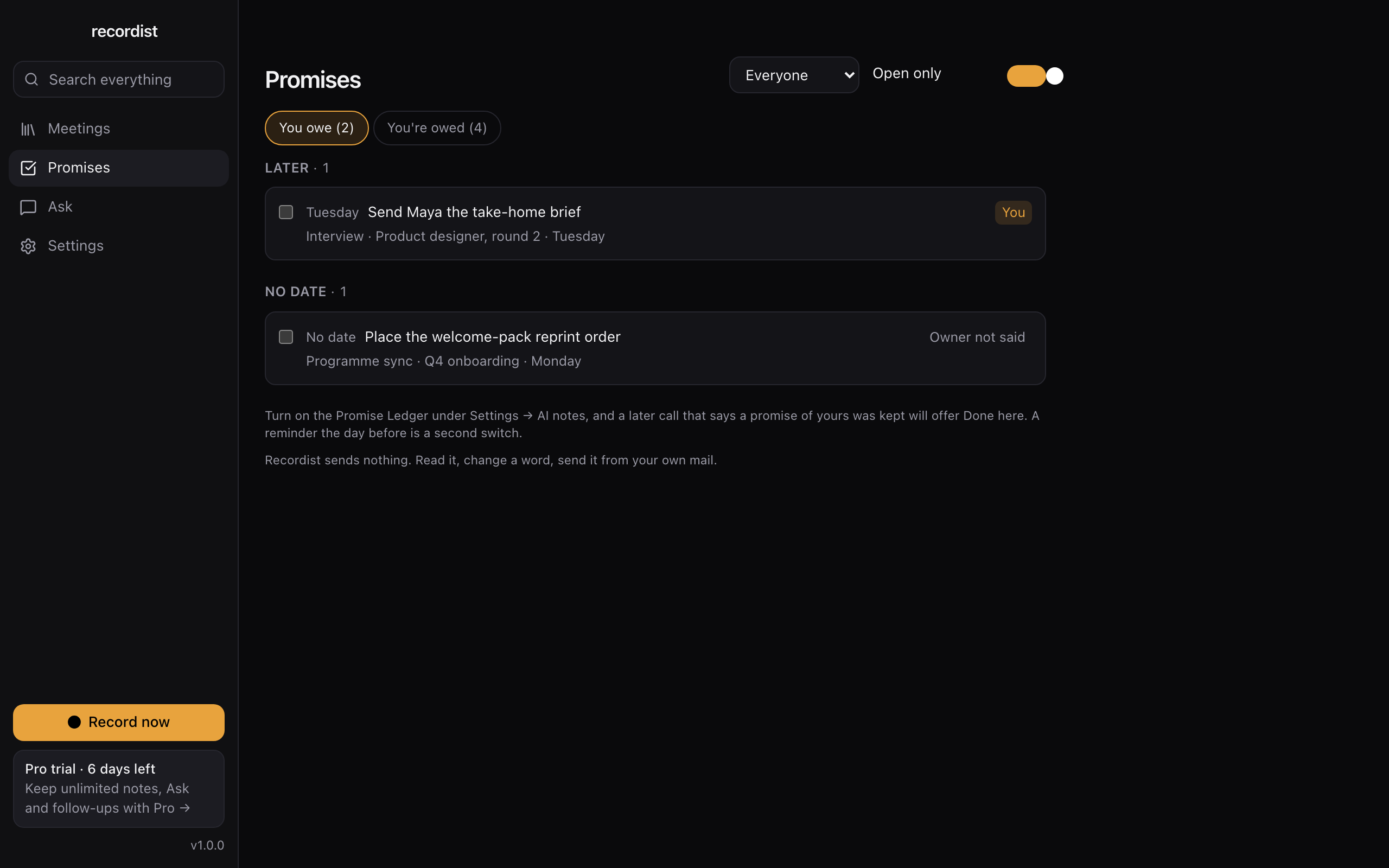
Promises collects the open ones from every meeting with notes, in two lists, what you owe and what you're owed, grouped by Overdue, Today, This week and Later, with the meeting each one came from and the words it was made in.
Promises from every meeting in two lists, what you owe and what you're owed, each with the meeting it was made in. The real app, shown with made-up people and meetings. -
Can the notes go into my ATS?
Press Copy all notes on the call and paste them into the candidate's record, or export the call as Markdown or text. There is no direct connection to an ATS, so nothing reaches one until you put it there.
-
Can I keep each client's candidates apart?
Yes. File a call under a client in Clients and it stays with them. Inside a client, search and Ask read only that client's calls, and outside one, search reads only what isn't filed until you press Search every client too. Nothing is filed until you say so, and filing is on every plan with no limit.
-
How long should I keep recordings?
You choose how long audio is kept, for example 30 days, and you can set whole meetings to be deleted after a number of days, with starred meetings kept. Whether to keep a particular call is a question for the record-keeping rules where you work, because hiring records often have a minimum retention period.
-
What does it cost?
Recording, transcription, search and export are free. AI notes are unlimited during your 7 days of Pro and then 3 a month. Pro removes that limit and adds Prep Briefs before you meet someone again. Its price is on the pricing page, and if you subscribe at the launch price, it stays the same for as long as you stay subscribed.
-
How do I start?
Download it, paste the template above, and record a practice call with a friend. Read what comes out. Then use it on the next candidate who says yes, and keep your own notes alongside until you trust it.
Next
What to do next.
Two minutes
Click around the real app
Open a sample interview, search for a word and tick a promise done, in your browser.
Free tool
How to ask to record a call
The words to say, and the rule where you and the other person are.
Free to start
Try it on your next call
Recordist is free to download for Mac, Windows and Linux. It needs no account and no email, and the 7 days of Pro include every Pro feature. Keep your own notes on anything that matters until you trust it.
Also for
Other kinds of work.
HR and recruiting
Fifteen interviews a week, and the hiring manager wants to know exactly what the candidate said.
Consultants
Your client remembers the call one way and you remember it another, and the scope is somewhere in between.
Startup founders
Customer calls, investor calls and hiring calls in the same week, and the detail you need is always from the one you didn't write down.
Lawyers
You want a record of the call, and you also have to answer for where that record is kept.
Therapists and counsellors
Recordist is not made for therapy sessions or calls about clients. This page explains why.
Coaches
You want to look at your client for the whole hour, and next month you need to know exactly what they said they would do.
The summary for IT, security and legal reviewers Every page, or four questions to find yours