Who it's for · For HR, recruiting and programme teams
Recordist records interviews and meetings on your Mac and writes the notes there
When the call ends, a model on your Mac writes notes from the transcript, with a summary, open questions and action items. Recordist doesn't join the call, so nothing appears in the participant list, and nobody else on the call is told that you are recording: the person leading the interview asks out loud before anyone clicks Record. Later, you can search for a word such as "notice" and hear the sentence where it was said.
The browser demo is the real app with made-up meetings. Nothing is recorded.
- Recordist runs on Macs with Apple silicon and macOS 14.6 or later. It isn't available for Windows or Linux yet.
- There is no account, and audio is never uploaded. The Privacy Ledger in the app lists the network requests it makes, apart from a few kinds listed in Help, none of which carries meeting content.
- Early builds aren't notarised by Apple yet, so macOS asks once before the first launch. On a managed work laptop, your IT team may need to allow it.
- Recording, transcription, search and Prep Briefs are free. AI notes are unlimited for your first 14 days and then 3 a month. Pro at $6 a month removes that limit, and its checkout isn't open yet.
-
What happens during an interview?
When a call starts using your microphone, a small card asks "Record this meeting?". It names the other person when your calendar invite lists one, and it reminds you that you're responsible for consent where it's required. Nothing is recorded until you click Record, unless you add an app to the automatic-recording list in Settings. For interviews, leave that list empty so the card asks every time. If nobody answers, the card closes after 45 seconds.
While you talk, an amber dot pulses in the menu bar and a live transcript builds up. Transcription happens on the Mac and keeps working with the Wi-Fi off. A few minutes after you hang up, the notes are ready.
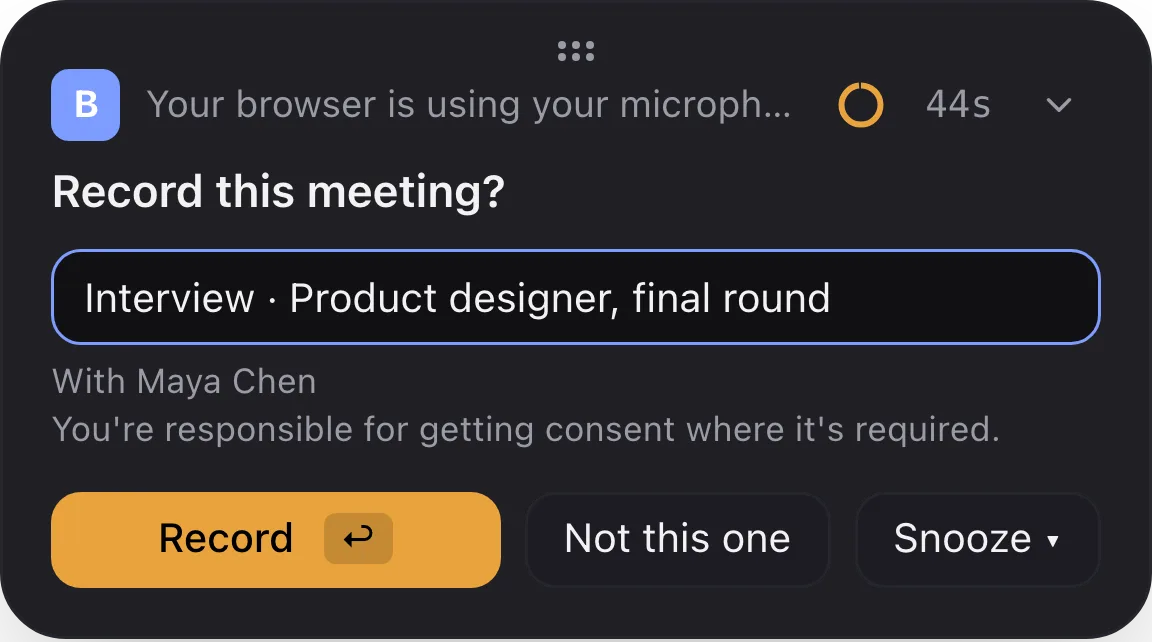
The card that appears when a call starts. Nothing is recorded until you click Record, unless you have put that app on the automatic-recording list in Settings. -
Does a bot join the call?
No. Recordist listens to your own Mac, your microphone and the sound of the call, so nothing appears in the participant list and nothing changes for the candidate.
The notes built into some meeting platforms don't use a bot either. The difference is elsewhere: those notes belong to whoever hosts the meeting and to the plan they pay for, while Recordist works the same on any platform, whoever hosts, and keeps one library on your Mac. For meetings your company hosts on a platform it already pays for, its built-in notes may be the right record, and Recordist covers the calls on other companies' platforms and the conversations in a room.
-
How do I ask a candidate for consent?
Recordist doesn't tell the other people that it is recording, and it can't ask them. The person leading the interview asks out loud, and clicks Record after a yes. One way to say it: "Before we start, would you mind if I record this so I can listen instead of typing? It stays on my laptop, and it's completely fine to say no."
If the answer is no, click Not this one and take notes the way you normally do. If someone joins partway through, ask again. The free consent script tool gives you the words for the place you and the candidate are in, and the rule that applies there.
-
Who is labelled as who in the transcript?
Your microphone is labelled You. Everyone on the other side of the call shares one label: the person's name when the calendar invite lists one other person, and otherwise "Speaker", which you can rename for each meeting. Recordist can't yet tell remote people apart, so in a panel call, check the recording before you quote anyone.
In an in-person interview recorded on the laptop, both voices reach the one microphone, so every line is labelled You, including what the candidate says. A phone screen on your mobile doesn't play through the Mac, so there is nothing for Recordist to record.
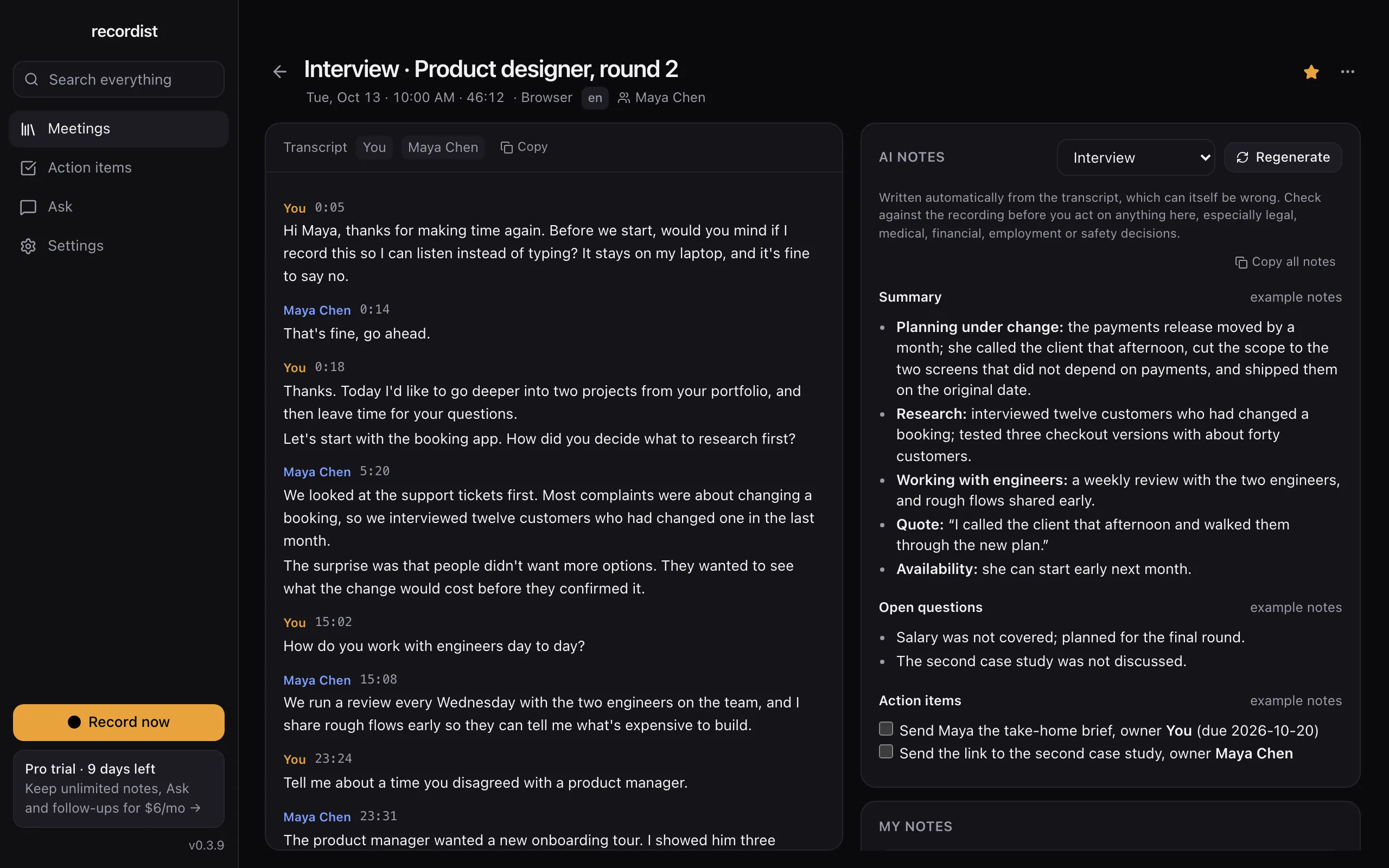
Open this interview in the demo
An interview with its transcript and notes from the Interview template. The real app, shown with made-up people and meetings. -
What do the notes say, and can they be wrong?
The Interview template asks the notes to keep evidence apart from interpretation and to quote the candidate briefly, word for word. Today it also asks for "strengths, concerns, and signals per competency"; in the next version that line becomes "note what was said about each competency; do not rate, rank or recommend anyone", because notes shouldn't judge candidates. The notes give no scores and no rankings.
Notes can be wrong, and transcription can be less accurate for some accents and ways of speaking. The notes carry the app's reminder to check against the recording before acting on anything, especially employment decisions, and clicking any line of the transcript plays that moment.
-
Who promised the scorecards by Wednesday?
After a call, the notes list action items with an owner and a due date when those were said out loud, for example "Sam, can you have the renewal decision by Friday?". The notes engine is instructed never to add people, owners or dates that aren't in the transcript. It can still make mistakes, which is why the recording is kept.
The Action items view collects the open items from every meeting, grouped by Overdue, Today, This week and Later, with the meeting each one came from.
See the action items in the demo
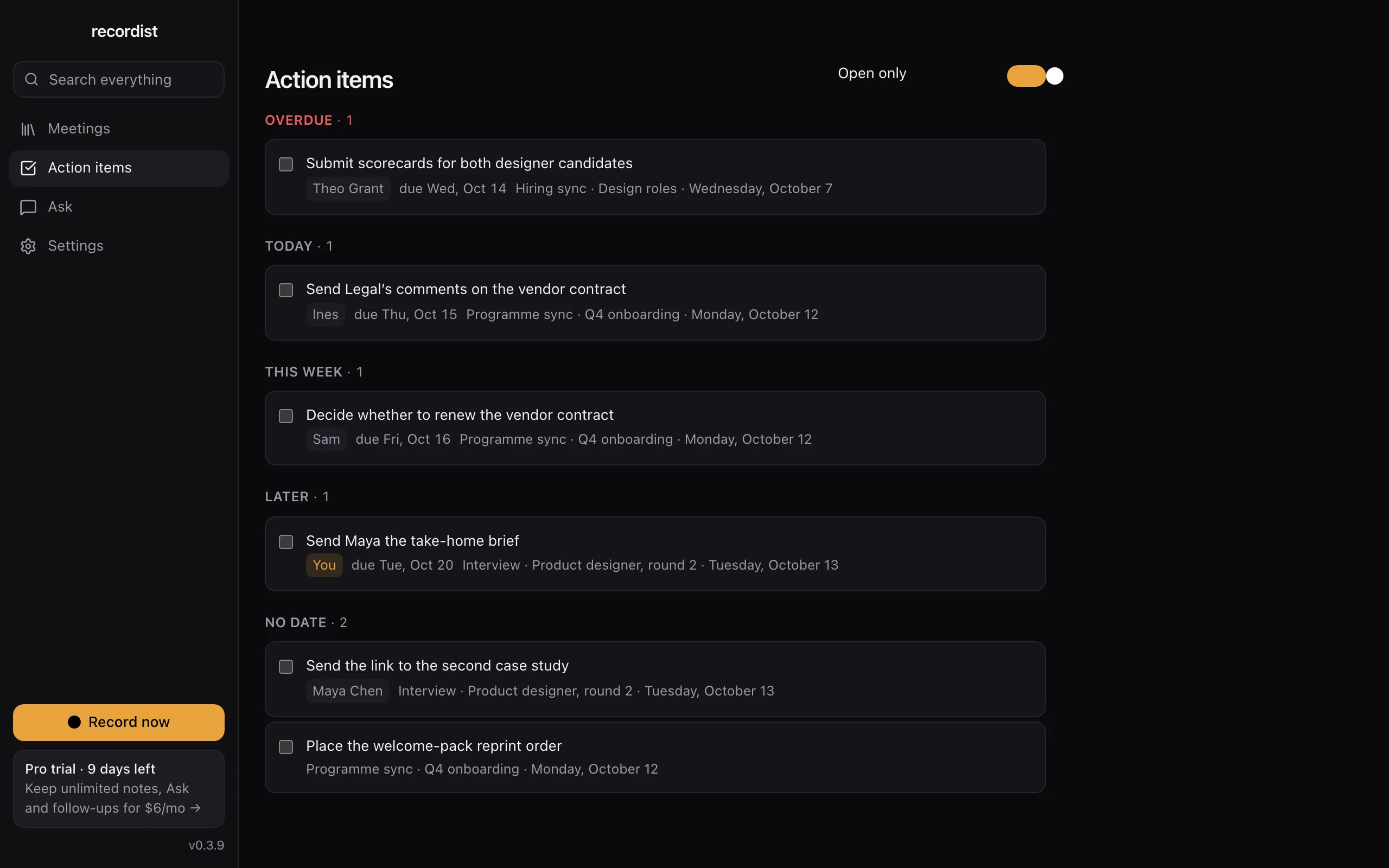
Action items from every meeting in one list, with owners and due dates. The real app, shown with made-up people and meetings. -
Can it prepare me for the second round?
Yes, when the interview is in your calendar. Up to 45 minutes before a call with someone you have met before, a Prep Brief shows what you decided last time, a summary of that meeting and the action items still open on both sides. It needs calendar access, and it works for calendar events with attendees.
See the Prep Brief in the demo
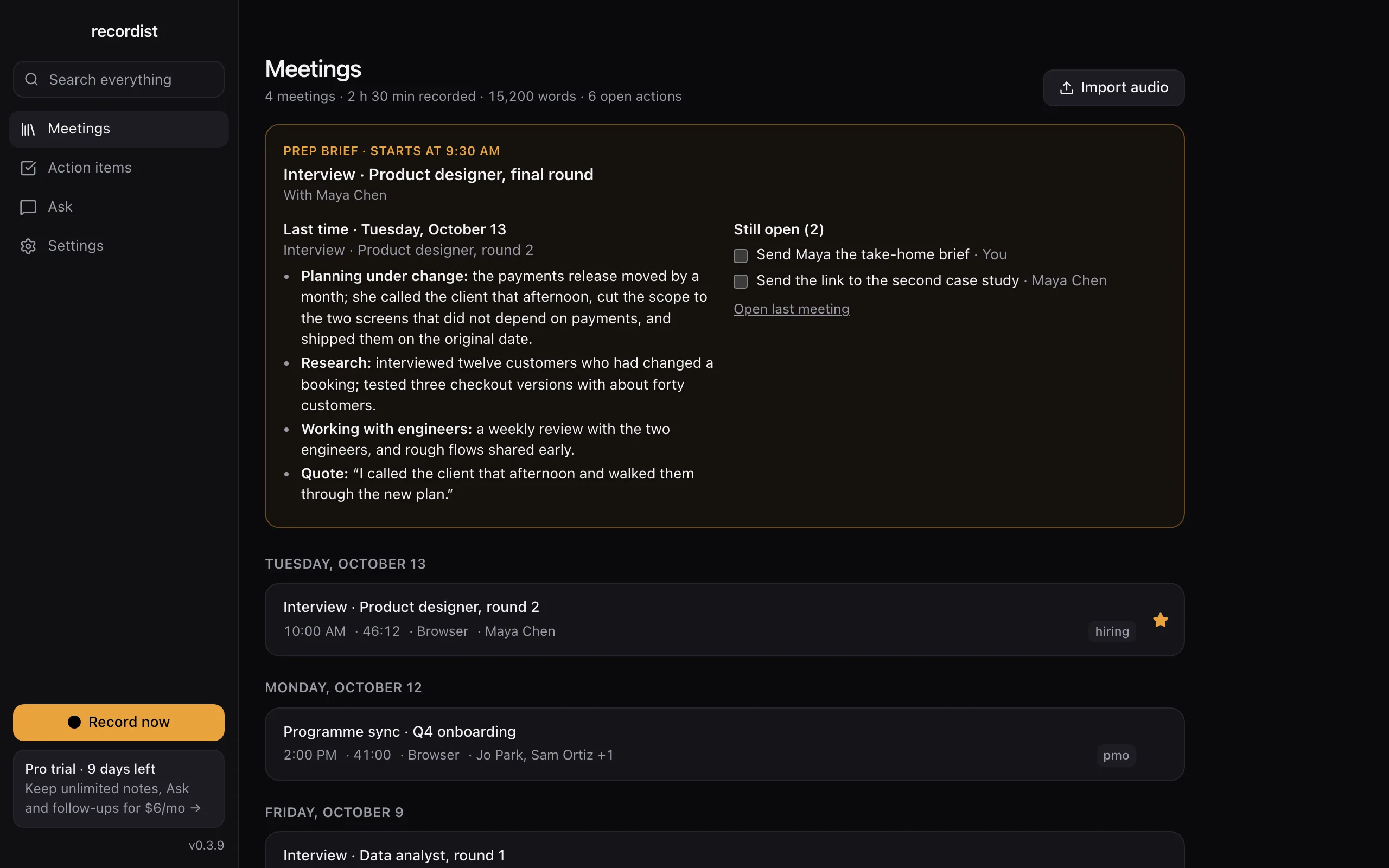
Every meeting you record, in one list on your Mac. The real app, shown with made-up people and meetings. -
Who said they could start "early next month"?
Type a word such as "start" or "notice", and Recordist lists every meeting where it was said, with the sentence and the time. Click a result to open that moment, then click the line to hear it. The search index is stored on your Mac and works offline.
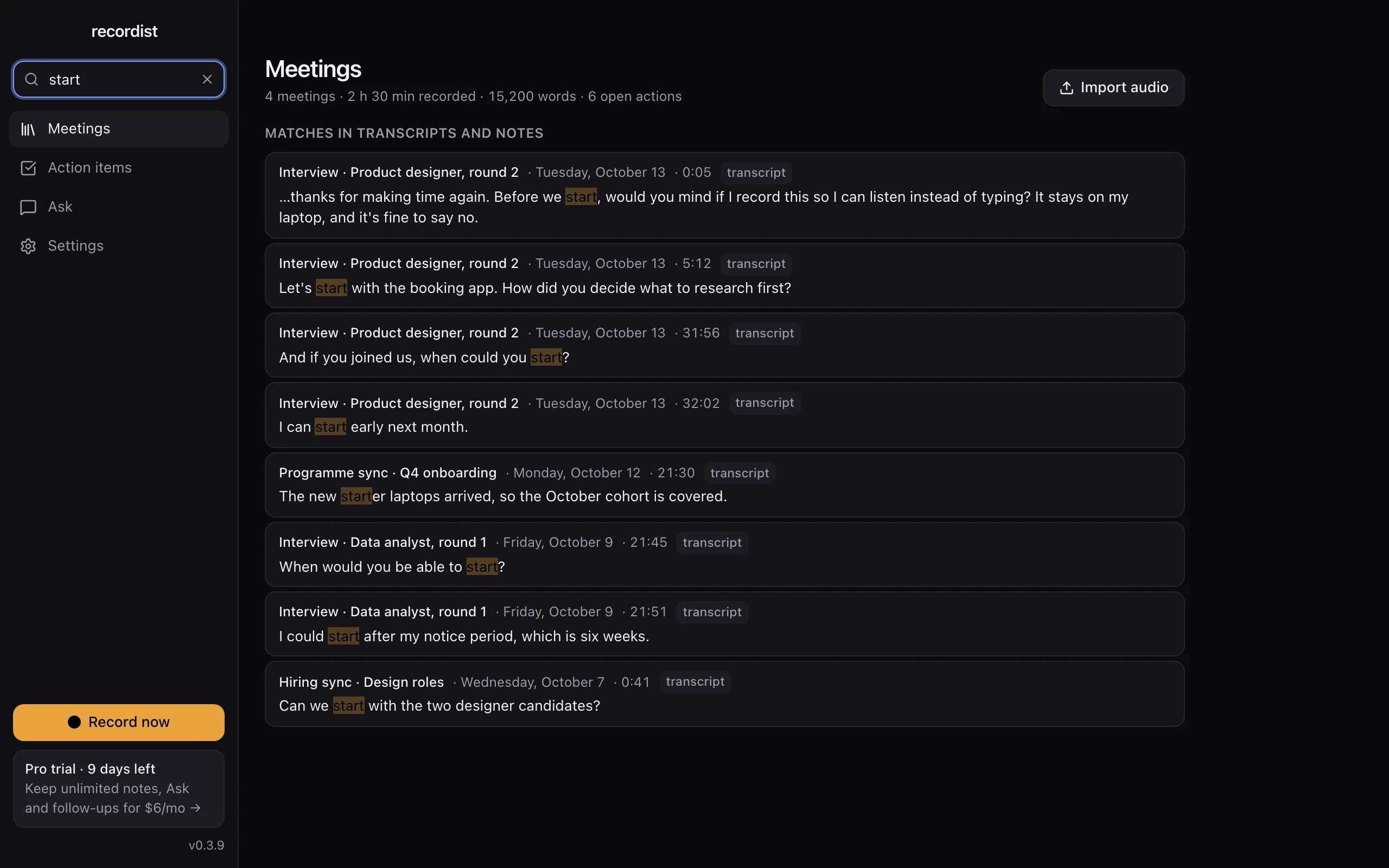
One word finds every meeting it was said in, with the sentence and the time. The real app, shown with made-up people and meetings. -
Where does the audio go, and how long is it kept?
It stays on your Mac. Transcription and notes run on the Mac with the built-in engine. There is no account, and audio is never uploaded. The Privacy Ledger in the app lists the network requests it makes, apart from a few kinds listed in Help, none of which carries meeting content.
You choose how long audio is kept, for example 30 days, and you can set whole meetings to be deleted after a number of days, with starred meetings kept. Automatic deletion follows your setting. Whether to delete a particular interview is a question for your company's records policy: hiring records often have a minimum retention period, and anything under a legal hold must be kept. A recording on your Mac is still a company record.
Open the privacy settings in the demo
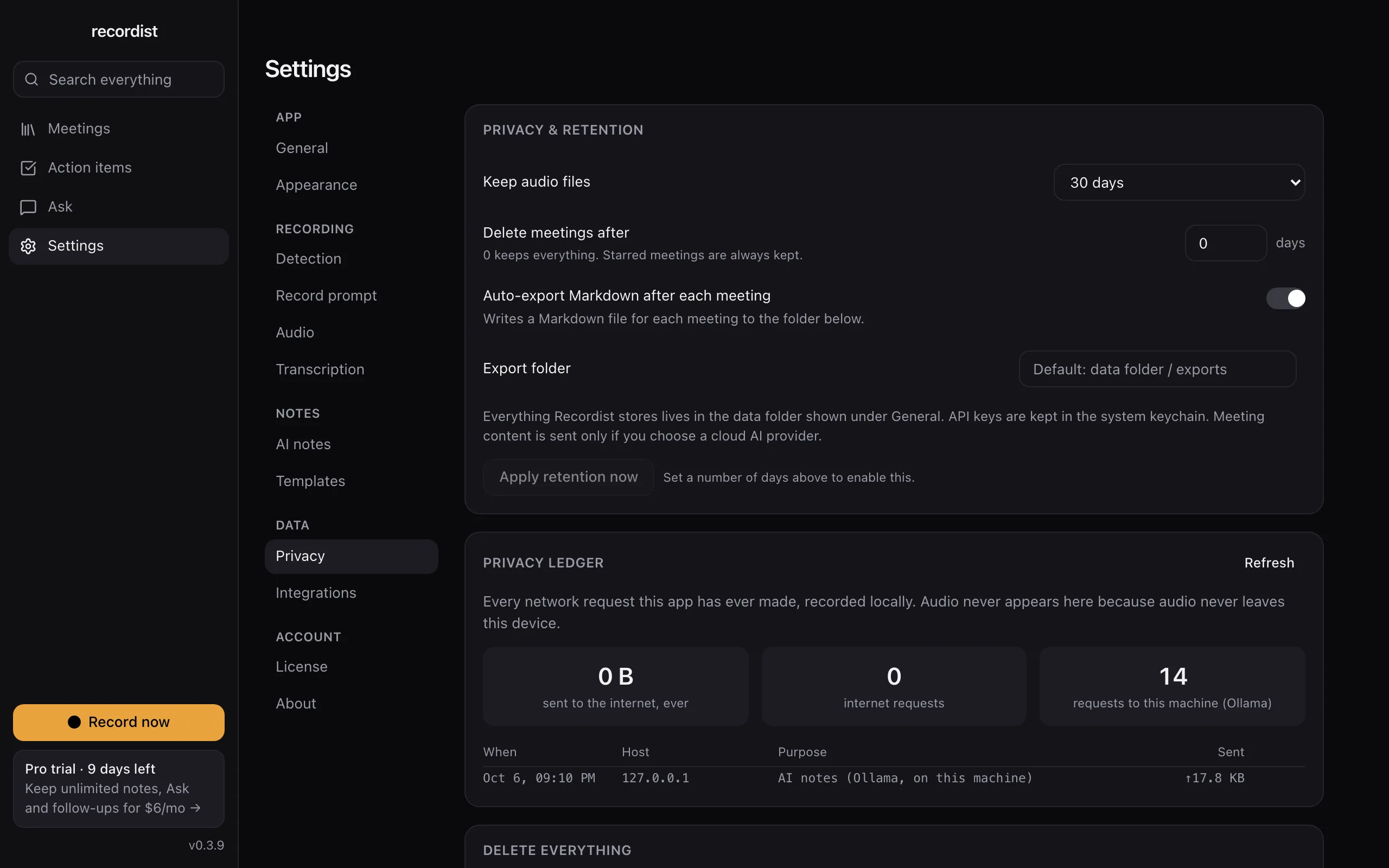
Retention settings and the Privacy Ledger, which lists the app's network requests. The real app, shown with made-up people and meetings. -
What will IT and legal ask before we try it?
Recordist runs on Macs with Apple silicon and macOS 14.6 or later. It isn't available for Windows or Linux yet. Early builds aren't notarised by Apple yet, so macOS asks once before the first launch. On a managed work laptop, your IT team may need to allow it. There is no central admin console, single sign-on or company-wide retention policy yet; Recordist is a personal working tool on one Mac. If your company has a policy on AI notetakers, that policy comes first.
The page for IT, security and legal reviewers answers their questions in one place, and you can forward it.
-
What does it cost?
Recording, transcription, search and Prep Briefs are free. AI notes are unlimited for your first 14 days and then 3 a month. Pro at $6 a month removes that limit, and its checkout isn't open yet. The meeting notes cost calculator works out what your team spends on notes today, with your own numbers.
-
How do we try it without making it a project?
One person tries it for a week on their own Mac: a practice call with a colleague first, then real interviews where the candidate agrees. Keep your own notes alongside until you trust it. If it helps, forward the reviewer page to IT and legal before anyone else installs it.
What to do next
Two minutes
Click around the real app
Open a sample interview, search for a word and tick an action item, in your browser.
Free tool
How to ask to record a call
The words to say, and the rule where you and the other person are.
Free beta
Try it on your next call
The Mac beta is free, and the first 14 days include every Pro feature. Keep your own notes on anything that matters until you trust it.
Also for
Startup founders
Customer calls, investor calls and hiring calls in the same week, and the detail you need is always from the one you didn't write down.
Lawyers
You want a record of the call, and you also have to answer for where that record is kept.
Therapists and counsellors
Session notes take your evenings. Recordist is not the tool for them, and this page explains why.
The summary for IT, security and legal reviewers · See every page, or answer four questions to find yours