Who it's for · For lawyers
What Recordist does for a law practice today, and what to wait for
Recordist records calls on your own Mac and writes the transcript and notes there, with no account and nothing joining the call. For client matters we suggest waiting for now: early builds aren't notarised by Apple, there is no legal hold for a single meeting, and search and Prep Briefs reach across every meeting on the Mac. This page sets out how it works so you can decide, or pass it to whoever reviews software at your firm.
The browser demo is the real app with made-up meetings. Nothing is recorded.
- Recordist runs on Macs with Apple silicon and macOS 14.6 or later. It isn't available for Windows or Linux yet.
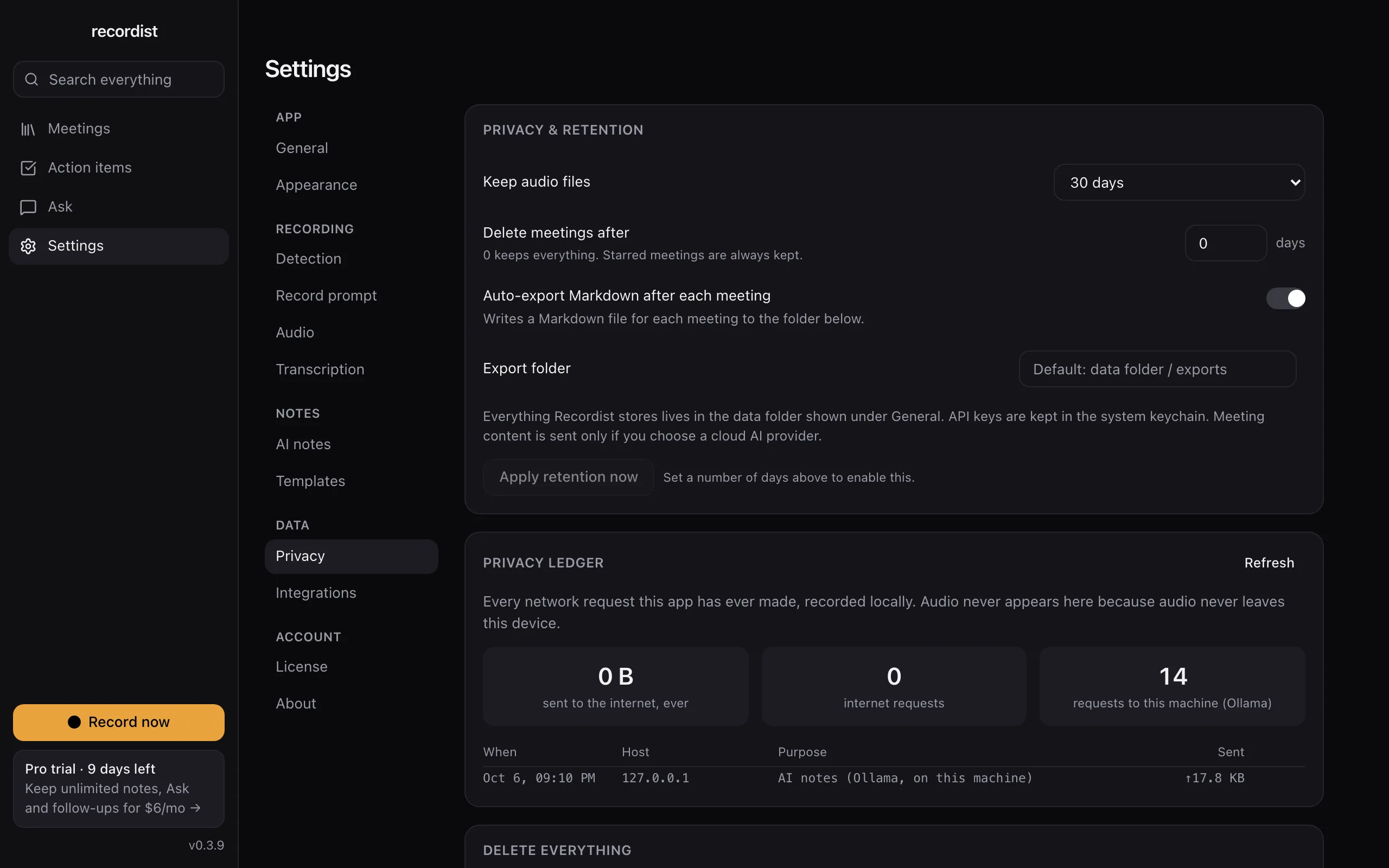
- There is no account, and audio is never uploaded. The Privacy Ledger in the app lists the network requests it makes, apart from a few kinds listed in Help, none of which carries meeting content.
- Early builds aren't notarised by Apple yet, so macOS asks once before the first launch. On a managed work laptop, your IT team may need to allow it.
- Recording, transcription, search and Prep Briefs are free. AI notes are unlimited for your first 14 days and then 3 a month. Pro at $6 a month removes that limit, and its checkout isn't open yet.
-
Should I use it for client calls today?
We suggest not yet, for three reasons. Early builds aren't notarised by Apple. There is no way to place one meeting under a legal hold. And search, Ask and Prep Briefs reach across every meeting on the Mac, so a search during a call about one matter can show material from another while your screen is shared.
It may suit your own meetings that involve no client information, such as practice-management calls or vendor calls. We will update this page when each of the three items above changes.
-
Where is the recording kept, and who can open it?
On your Mac, in the app's data folder under your macOS user account. Recordist doesn't encrypt its own files; with FileVault turned on, macOS encrypts the whole disk. Anyone who can sign in to your Mac account can open the app and its meetings.
-
Does anything leave the Mac?
Not meeting content, with the built-in engine. There is no account, and audio is never uploaded. The Privacy Ledger in the app lists the network requests it makes, apart from a few kinds listed in Help, none of which carries meeting content. If you choose a cloud AI provider for notes, or connect an AI assistant through MCP, the transcript goes to that provider under its terms. Both are off until you set them up.
Open the privacy settings in the demo
Retention settings and the Privacy Ledger, which lists the app's network requests. The real app, shown with made-up people and meetings. -
What about confidentiality and privilege?
That is a question for your professional rules, not for us. The ABA's Formal Opinion 512 (2024) and many state and provincial bars have published guidance on AI tools, and some address recording clients. Read the guidance that applies to you before you record anything to do with a client.
-
What about consent to record?
Recordist doesn't tell the other people on a call that it is recording. You ask, and you click Record after a yes. Some places require everyone on the call to agree. The recording law guide and the consent script tool show the rule for the places involved, and the cautious answer when you don't know where someone is.
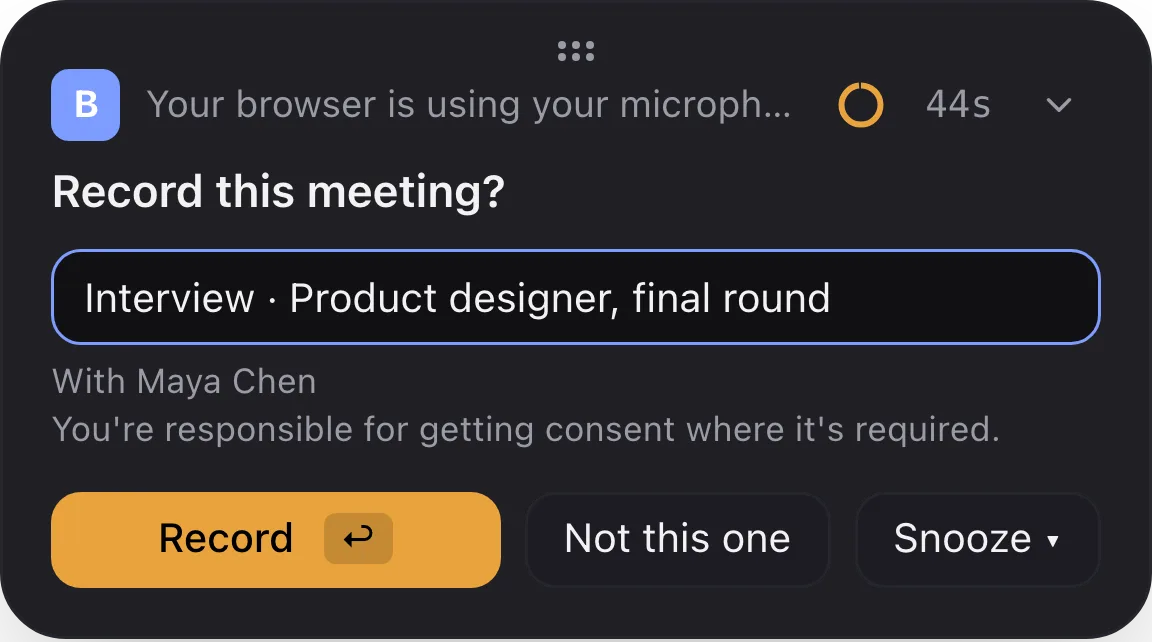
The card that appears when a call starts. Nothing is recorded until you click Record, unless you have put that app on the automatic-recording list in Settings. -
How does deletion work, and what about a legal hold?
You choose how long audio is kept, from Forever to deleting it right after transcription, and you can have whole meetings deleted after a number of days, with starred meetings kept. These settings apply to every meeting. If anything on the Mac is under a hold, set audio and meetings to be kept until the hold is lifted.
-
Can I keep one client's meetings apart from another's?
Not yet. Every meeting is in one library. We are building a way to group meetings by client so that search, Ask and Prep Briefs stay inside one client. This page will say so when it ships.
-
What does it cost?
Recording, transcription, search and Prep Briefs are free. AI notes are unlimited for your first 14 days and then 3 a month. Pro at $6 a month removes that limit, and its checkout isn't open yet.
-
What should our firm's reviewer read?
The page for IT, security and legal reviewers covers data, network requests, retention, consent and what Recordist can't do yet, in one place you can forward.
What to do next
Two minutes
Click around the real app
Open a sample interview, search for a word and tick an action item, in your browser.
Free tool
How to ask to record a call
The words to say, and the rule where you and the other person are.
Free beta
Try it on your next call
The Mac beta is free, and the first 14 days include every Pro feature. Keep your own notes on anything that matters until you trust it.
Also for
Startup founders
Customer calls, investor calls and hiring calls in the same week, and the detail you need is always from the one you didn't write down.
HR and recruiting
Fifteen interviews a week, and the hiring manager wants to know exactly what the candidate said.
Therapists and counsellors
Session notes take your evenings. Recordist is not the tool for them, and this page explains why.
The summary for IT, security and legal reviewers · See every page, or answer four questions to find yours