Who it's fortherapists and counsellors
Recordist is not made for therapy sessions
Session notes are among the most sensitive records anyone keeps. Tools for them have to meet health privacy law, the record-keeping rules of your profession and your regulator's standards. Recordist hasn't been built or assessed for that, so we ask you not to use it for sessions, supervision or any call where a client is discussed.

Free, with no password. Your email brings your key for 7 days of Pro, with no card. By default, nothing is recorded until you say yes.
The browser demo is the real app with made-up meetings.
-
Why not, if the audio stays with me?
Keeping audio with you is one part of what clinical records need. Recordist has no encryption of its own, no access controls beyond your own login and no record of who opened what. It hasn't been assessed against HIPAA, PHIPA or similar laws. Its AI notes can be wrong. And when notes are ready, a notification shows the meeting title and the first line of the summary on your screen.
-
Will you sign a business associate agreement?
No. Recordist is not made for clinical records, so we don't sign business associate agreements under HIPAA, or agreements under PHIPA or other health privacy laws. The app never sends us your recordings, transcripts or notes. Please don't send us health information about your clients by email, in a support ticket or in a question to Wren.
-
What about supervision or case consultation calls?
Those discuss clients, so the same answer applies: please don't record them with Recordist.
-
Where can it help a practice?
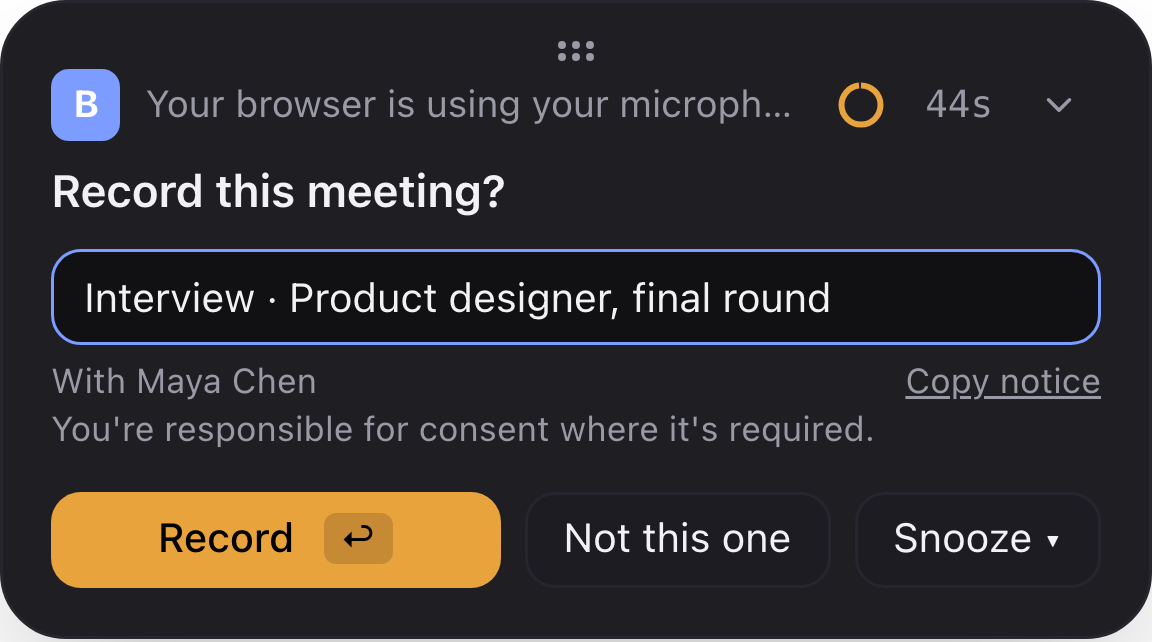
On calls with no client information in them, such as calls with your accountant, a landlord, a software vendor or a colleague about running the practice. By default it asks before it records, and the card that appears when a call starts lets you click Not this one for everything else. If you see clients by video on the same Mac, don't add that video app to Record without asking for in Settings.
-
Is there a tool you would suggest instead?
We don't recommend other products. Look for tools made for clinical documentation that name the health privacy law of your jurisdiction in their contract, and ask your regulator or professional association what they expect.
-
Will this change?
We have no plans to build Recordist for clinical sessions. If that changes, this page will say so first.