Download
Your next call, on the record.
The promise you forgot. The client who remembers it differently. Say yes once, and the whole call is kept on your laptop: what was decided and what was promised, in the words it was said. Nothing joins the call.
Free, with no account. 7 days of Pro to start, with no card. By default, nothing is recorded until you say yes. Intel Mac? What works there.
Recordist is an app for your laptop: Mac, Windows and Linux. Send yourself the link, and your next call is on the record.
Two emails: a link to confirm, then a copy of your key. Nothing else unless you ask. We never sell or share your address, and Resend, our email service, sends them for us. Privacy
Downloading
Recordist for Mac is downloading.
Thank you for trying Recordist. Three small steps and it is ready before your next call. Open it now, so it is set up in time.
- 01Open the download and drag Recordist to Applications, then open it from there.
- 02Allow the microphone and system audio when your Mac asks, so both sides of the call are heard. Calendar is optional: it names your meetings and who is in them.
- 03Close the window when you like. Recordist waits in the menu bar and, when your next call starts, asks: Record this meeting? Nothing is recorded until you say yes.
The first time it opens, Recordist downloads its speech model: 142 MB in English, 466 MB for other languages. That usually takes a minute or two, and you can record once it finishes. The notes engine, 1 to 3 GB, follows in the background.
While it downloads, see a finished call in your browser
Every install includes 7 days of Pro, so your first calls are written up in full.
No call today? Import a recording you already have: in Recordist, Meetings, then Import audio. One of 10 minutes or more starts your 7 days of Pro, and the notes follow the transcript.
If Windows offers no Run anyway, as on PCs with Smart App Control or managed by work, try the demo in your browser, and we will email you when the app is signed too.
The five-minute guide Didn’t start? Download again.
Another laptop? All downloads
Every laptopMac, Windows and Linux
-
1.0Notarised by Apple
DownloadmacOS
Your laptopmacOS 14.6 or later, Apple silicon
This Mac has an Intel processor, and Recordist is built for Apple silicon, so this file would not open here. See what works on this Mac, such as the demo in your browser.
Signed with our Developer ID and notarised by Apple.
-
0.3.15Preview
DownloadWindows
Your laptopWindows 10 or 11, 64-bit
The installer is signed by us through Microsoft. While the signature is new, Edge and Windows may each ask once: choose Keep anyway, then More info and Run anyway. Every step
-
0.3.15Preview
DownloadLinux
Your laptopEach file’s SHA-256 is below. Installing on Linux
Free. No account. Nothing is recorded until you say yes.
System requirementsVerify your downloadSwitching from a meeting bot?
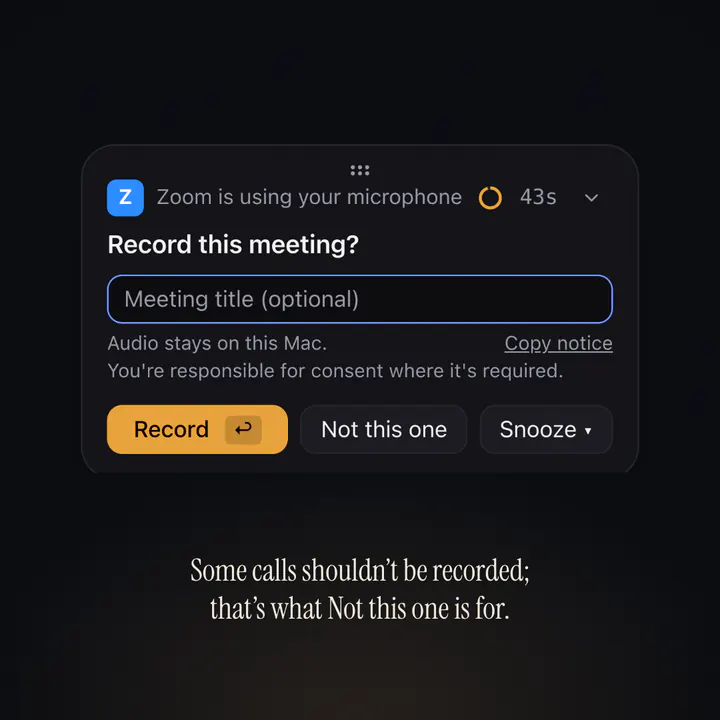
A 6-second film of the real interface. Zoom takes the microphone and Recordist’s card appears: Record this meeting? The pointer presses Not this one, and the card goes. Nothing is recorded. Some calls shouldn’t be recorded; that’s what Not this one is for.
Before any call
You decide, call by call. When a call starts, a small card asks whether to record it. Press Not this one and nothing is recorded. By default it asks before it records.
Before you install
System requirements
- MacmacOS 14.6 or later on Apple silicon (M1 or later).
- Memory8 GB for local notes (expect minutes per meeting); the largest built-in notes model is meant for 16 GB or more. A cloud key of your own shortens the wait.
- DiskLeave about 5 GB free for the first setup. In detail: about 15 MB for the app, 75 MB to 1.6 GB for a transcription model, the built-in notes engine with a 0.9 GB, 2.4 GB or 4.5 GB model, and about 350 MB per hour of meeting audio (your side, their side and a mix), which is deleted after 30 days unless you change Keep audio files in Settings → Privacy.
- Windows64-bit Windows 10 or 11 and a processor with AVX2. Most Intel Core processors from 2013 on and AMD Ryzen have it; some Pentium and Celeron models do not. The installer is signed by us through Microsoft, and the app it installs will be signed from the next Windows release. While the signature is new, Edge and SmartScreen may ask once; until the app is signed, Smart App Control or a managed PC may stop it.
- Linuxx86_64 with glibc 2.35 or newer (Ubuntu 22.04 or Debian 12 and later), and PipeWire or PulseAudio. The AppImage also needs FUSE 2. Older distributions, such as Ubuntu 20.04 and Debian 11, are not supported.
Checksums
Verify your download
Each file's SHA-256 is listed below. In the folder you downloaded to, run the command for Mac, Windows or Linux, and compare the result with the SHA-256 below. They should match exactly.
- MacVersion 1.0.6 ·
Recordist_1.0.6_aarch64.dmg- WindowsVersion 0.3.15 ·
Recordist_0.3.15_x64-setup.exe- Linux (.deb)Version 0.3.15 ·
Recordist_0.3.15_amd64.deb- Linux (AppImage)Version 0.3.15 ·
Recordist_0.3.15_amd64.AppImage
The SHA-256 of each file shows here once the page has loaded.
- Mac (Terminal)
shasum -a 256 Recordist_1.0.6_aarch64.dmg- Windows (PowerShell)
Get-FileHash .\Recordist_0.3.15_x64-setup.exe -Algorithm SHA256- Linux
sha256sum Recordist_*_amd64.AppImage Recordist_*_amd64.deb
macOS builds are signed by us, notarised by Apple, and the Windows installer is signed by us through Microsoft, so on both, the checksum is an extra step for people who want it. On Linux, the checksum is how you know the files are ours. Updates delivered by the app are signed with our own key on every platform.
Windows and Linux
About Preview
Windows and Linux are built from the same code as the Mac app, behind it for now. They are a preview until real calls have been recorded on them. The Windows installer is signed by us through Microsoft, and the app it installs will be signed from the next Windows release; while the signature is new, Windows may ask once before it runs. The Mac app is what we use every day. Questions go to hello@recordist.app; diagnostics (Settings → General → Export diagnostics) contain no audio or transcripts. Current status.
Some features are Mac-only for now: FaceTime detection, Apple notarisation, Prep Briefs (they read the Mac's calendar) and the managed settings for IT. On Windows and Linux window titles are not read, so a call in a browser is named only with the Chrome extension. The AppImage needs FUSE 2; the .deb installs with apt: Installing Recordist on Linux.